
Going Blue?

The editor currently supports Play Acoustic and Play Electric (see The Editor is Going Electric for the story behind PE support). The next product on the roadmap is the original VoiceLive Play — the blue one — and we need a few users with one to help us finish it.
VoiceLive Play uses a different preset format than its successors (older firmware family, 2 data packets per preset instead of 5/4, 114-byte packets instead of 110), so we can't just inherit the Play Acoustic byte map. The structural skeleton is in place — the editor knows the product ID (0x69), the packet count, and where to look — but the actual byte positions for each parameter are mostly unmapped.
Filling them in needs a real device. Here's how to help.
What we need
- Preset packs. If you have
.tchpreset files for VoiceLive Play — especially the Factory Presets — please send them. We bundle them in the editor's Load → Preset Packs menu so other Blue users can load them. The VoiceSupport 2 install folder on your computer should contain a "VoiceLive Play" directory with apacks/subfolder full of.tchfiles; that's the source. - Probe data. A guided ~30 minute round of single-parameter probes that maps each byte position to the parameter it controls. The procedure is identical to what we did for Play Electric — the editor walks you through it step by step, and the results stream to our telemetry automatically. No copy-paste, no email.
How to run the probes
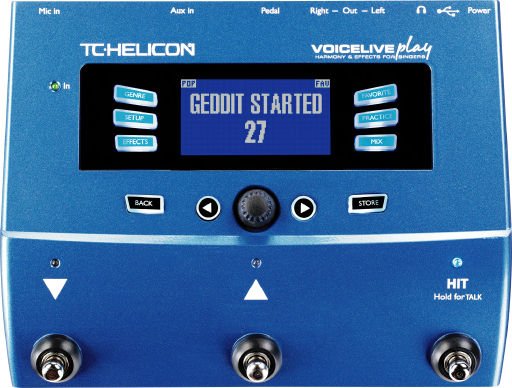
- Plug your VoiceLive Play into your computer via USB and power it on.
- Open the probe page in Chrome or Edge:
oddeyez.se/app/connect.html - Sign in with the invitation code
tchelp-2026and any nickname you want. The nickname is just so we can tell your results apart from another tester's — it's not a real account, no email needed. - Click Connect device, then Identify device. The page confirms it's a VoiceLive Play and unlocks the test sections.
- Pick a section from the dropdown and click Start section. Each section walks you through 3–24 single-parameter changes. For each step, the page tells you exactly which knob/slider to move on the device — you move it, click Capture & diff, and the page records what byte just changed.
The sections are ordered roughly easiest-to-hardest:
- Setup → Input (6 probes, ~5 min) — no STORE needed
- Setup → Output (5 probes, ~4 min) — no STORE needed
- Setup → Global (2 probes, ~2 min) — no STORE needed
- Setup → Loop (3 probes, ~3 min) — no STORE needed
- Setup → System (5 probes, ~5 min) — no STORE needed
- Mix (6 probes, ~5 min) — no STORE needed
- Vocal FX Controls (7 probes, ~5 min) — STORE per probe
- Vocal FX Value params (18 probes, ~15 min) — STORE per probe
- Style bytes (7 probes, ~5 min) — STORE per probe
- µMod style sweep (24 probes, ~15 min)
- Delay style sweep (18 probes, ~12 min)
You don't have to run all of them in one sitting — each section is independent and submits as you go. Even one or two sections is genuinely useful.
What you'll see on the device
Read-only. The probe page never writes to your device. It only sends standard MIDI query messages — it reads back what's currently stored, captures it as a baseline, and then asks you to make a change yourself by turning the knob on the device. Anything that changes does so because you changed it. We don't push presets, modify settings, or alter firmware.
The first probe page reads your factory preset slots 1–10 plus the global setup so we have a known starting state. From there, each step is "set this one parameter to this value, then click Capture" — and the page diffs the new device state against the previous capture to identify which byte stores that parameter.
What's in it for you
Once we have a few hundred probe results, the editor will support VoiceLive Play the same way it supports Play Acoustic and Play Electric today — full preset editing, fetch from device, send to device, setlists, Stage Traxx automation, all of it. Your data is the path to making that real.
Bug reports + feedback
If something on the probe page misbehaves, or you want to share preset packs without running the full probe flow, use the bug-report link in the footer of the editor (or file an issue on GitHub).
Thanks in advance — the editor exists because users like you spent a Saturday afternoon pressing buttons on a device while a browser tab took notes. Each new product we add is one more discontinued TC Helicon pedal that doesn't have to die just because VoiceSupport 2 did.